 ILTECHConfigSphere.
NETWORK CONFIGURATIONS. UNDER CONTROL.
Your network.
Your configurations.
Your peace of mind.
Network Configuration Backup & MonitoringAutomated network configuration backups, change visibility and notifications in one place. Meet ILTECH ConfigSphere. For IT administrators and IT service providers managing their customers’ networks, as well as organizations managing their own.
NETWORK SYSTEMS
Network overview
DEMOADAPTERS FOR SELECTED PLATFORMS






CONFIGSPHERE 0.11.2 · PRE-RELEASE
Try ConfigSphere before release.
Create an account to download the Windows preview. Try up to 100 devices for six months. The offer is open until 31 December 2026.
Own HTTPS certificates
Import PFX/P12 or PEM/CRT with a matching key and certificate chain. Review DNS names, validity and key checks in System.
Installation and portability
MSI installation and upgrades, a configurable web port and encrypted .configsphere transfers in format 2 with limits up to 10 GiB.
History retention and help
Preview and confirm cleanup using age and minimum backup counts, with the latest backup protected. Built-in setup help is available in Slovenian and English.
Development release. Public code signing and parts of real-server production acceptance remain open, including applying customer HTTPS certificates. Separate UniFi site backups and OAuth2 are still planned.
LESS MANUAL WORK. MORE VISIBILITY.
Configurations in one place.
Changes in plain sight.
From the first backup to configuration history. ConfigSphere brings everyday network administration tasks together.
01
Automated backups
Schedule configuration backups for selected devices. Run an individual backup or start a batch manually.
02
History and comparison
Keep configuration versions and compare text-based backups. See what changed and investigate with context.
03
Customers and locations
Organize devices by customer and location, share credential profiles and inherit backup schedules.
04
Email and Microsoft Teams
Receive backup results and change notifications. Batch summaries keep the results of each run together.
05
Protected access
Encrypted backups and credentials, device identity verification, user roles and TOTP MFA for console access.
06
Import and portability
Add devices using CSV/XLSX import with a preview. Encrypted .configsphere exports transfer ConfigSphere data between installations.
FROM DEVICE TO BACKUP
A clear workflow.
Day after day.
01
Connect your devices
Choose a platform, add connection details and verify device identity.
02
Set your schedule
Schedule backups by device, customer or location.
03
Review the results
Browse backups, compare changes and check your reports.
THE RIGHT PLATFORM. THE RIGHT ADAPTER.
Built for diverse networks.
Compatibility depends on the operating system family and version. We check your models and backup workflow together before deployment.
Fortinet
FortiGate / FortiOS
Backup confirmed on FortiGate 120G.
MikroTik
RouterOS
Adapter for RouterOS 6 and 7.
Cisco
IOS / IOS XE
Validation on your specific model required.
HPE / Aruba
ProCurve · Comware · AOS-CX
Initial adapters; device acceptance testing required.
Ubiquiti
UniFi OS Server
System backup over HTTPS; restore validation required.
ConfigSphere is in active development. An available adapter does not imply verified support for every model from a vendor. Separate UniFi site backups remain planned.
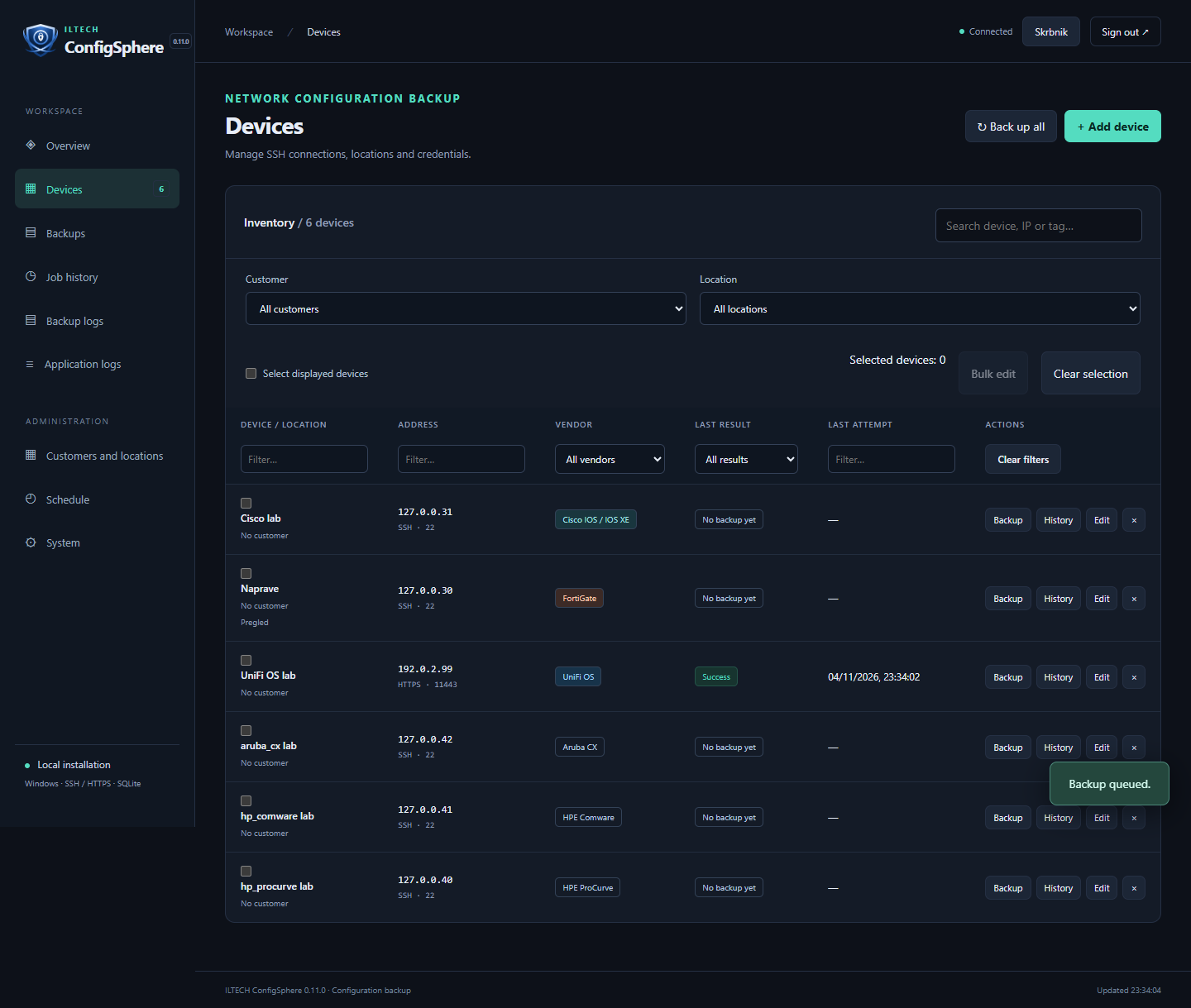
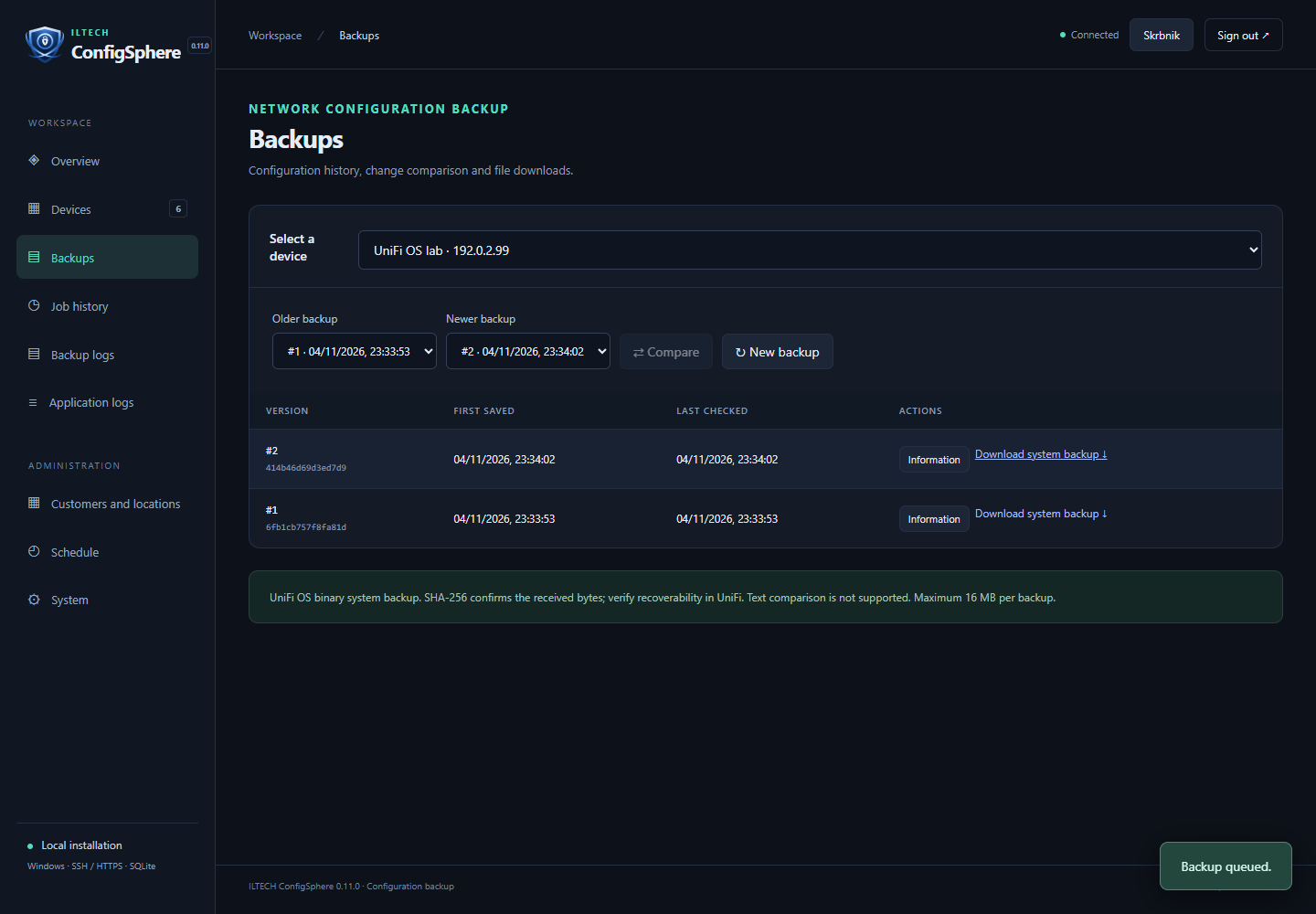
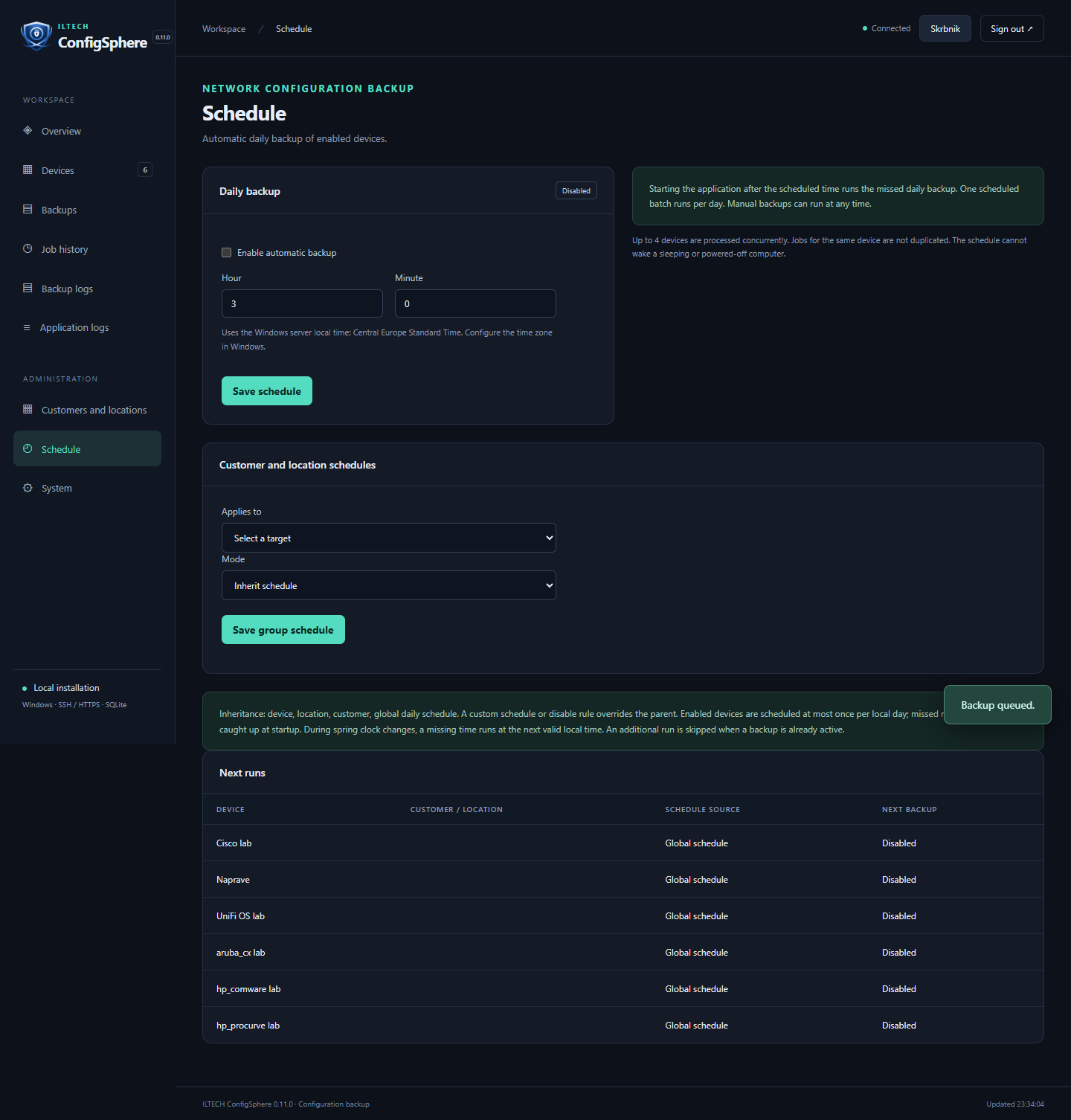
See the application.
Screenshots of an earlier development version with sample data. They still show the former product name. Explore the interactive demo for the current branding.
PRICING
A plan for your network.
Annual licence for one instance. All prices exclude VAT. Updates are included during the licence term.
Free
0 €
Up to 10 registered devices
No time limit. Start with a small network and choose a larger plan when you need more capacity.
Explore the demo| Plan | Total devices | Per year |
|---|---|---|
| 25 | 25 | 99 €per year |
| 50 | 50 | 179 €per year |
| 100 | 100 | 299 €per year |
| 250 | 250 | 599 €per year |
| 1000 | 1,000 | 999 €per year |
| Unlimited | No licence limit | 1,490 €per year |
Plan capacity is the total device count, not additional seats above Free. Unlimited has no licence device limit; actual capacity depends on your environment.
Evaluation licence
A 100-device evaluation licence for 3 or 6 months is available with ILTECH approval. Evaluation licences expire without an additional grace period.
Renewal and stored data
Paid licences include a 30-day renewal grace period after expiry. Afterwards, new backups are limited to the Free allowance of up to 10 selected devices. Stored history and export remain accessible.
ROADMAP
Where ConfigSphere is heading.
A development roadmap for IT administrators, IT service providers and organizations managing their own networks.
01 / AVAILABLE
The foundations are in place.
- Configuration backups, history and comparison.
- Customers and locations, schedules, roles, TOTP MFA and history-retention preview (0.11.0).
- Email and Teams notifications, UniFi system backups, licensing, web-port controls and own HTTPS certificates (0.10.4).
02 / NEXT STEPS
More control over everyday work.
- Additional administrators with appropriate permissions and account-change auditing.
- UniFi sites: mapping to customers and locations, with separate backups and schedules.
- Per-customer recipients and a library of named schedules.
03 / FURTHER DEVELOPMENT
Broader support and integrations.
- Additional adapters validated on real devices, and access auditing.
- OAuth2 for Microsoft 365 and Google; SSO options according to agreed needs.
- Production acceptance of the MSI installer, recovery and Windows service, plus public code signing before wider release.
This roadmap describes the direction of development, not committed release dates. Planned features are not available yet; priorities may change based on testing and user needs. We verify compatibility with your devices before deployment.
GOOD TO KNOW
Before your first connection.
Is ConfigSphere a cloud service?
ConfigSphere is a self-hosted Windows application with a web interface. You manage your devices, credentials and backups in your own environment.
Does ConfigSphere automatically restore device configurations?
Download a backup and use the recovery procedure supported by your device. Automated configuration push to devices is not currently offered.
How do I get started?
Email us with your platforms, approximate device count and preferred deployment. We will arrange a demonstration and compatibility review.
How much does ConfigSphere cost?
Free includes up to 10 registered devices. Paid annual licences for one instance start at €99 excluding VAT. See pricing and all plans.
Are both languages available?
Yes. Both this website and the ConfigSphere application interface are available in Slovenian and English.
MEET CONFIGSPHERE
Next step?
Let’s talk about your network.
Tell us which devices you manage and what you need. Together, we will explore how ConfigSphere fits into your environment.
Opens your email application. You send the message yourself.